Category: Mobile Devices

  • Zoho Creator Mobile: Simply Amazing

    Zoho Creator Mobile
    I wanted my first 2008 blog entry here to be a positive one. Well, I’ve got a lot of positive things to say about…

    Zoho Creator Mobile

    …which is part of the Zoho suite of web applications that includes a word processor, spreadsheet, presentation tool, note taker (somewhat like OneNote), wiki, and numerous other web based business ready applications. Zoho creator lets you quickly create web-fied database applications. The mobile aspect of this web service was announced back on November 19, 2007. But, thinking it would take forever to configure a test database for testing on a mobile device, I didn’t take a look at it until now. I definitely should have taken a look at it back in November. I probably could have increased my mobile productivity significantly if I had done that.

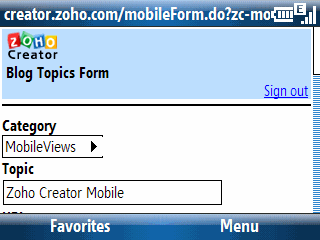
    Here’s what I did this evening. I already have a Zoho account. So, I logged in on a Windows-based PC and went into the Zoho Creator module. I was surprised to see that there was a simple drag-and-drop box area on the creation phase that said I could drop a number of client-side data objects including a selection from a live Excel spreadsheet. I opened a spreadsheet containing possible topics for my blogs, selected the range of entries in it, and then pasted it into the Zoho Creator web box. The pasted data looked like a textual mess. “This can’t possibly work,” I told myself. However, when I moved on to the next step, Zoho Creator had correctly identified the header information and associated rows and columns. I wanted to add a new field (column) to the data to test the drop-down box selection feature. And, yep, Zoho Creator let me quickly (within seconds) add a field with pre-defined selection options for the drop-down menu. I saved these changes and moved over to a Windows Mobile 6 Smartphone (Standard Edition) and went to the Zoho Creator Mobile site to see what it looked like there. You can see part of the record entry screen in the figure above.

    After filling out a few (but not all) of the fields, I saved what I had and moved back to the desktop. Back on the desktop, I filled out a few more fields and saved the result. Back on the Smartphone, I took another look at the record and saw the updated information.

    I turned on my iPod touch and went to the Zoho Creator Mobile site to verify that it worked with the Safari browser which, of course, it did (the Safari browser is far more capable than the Windows Mobile Internet Explorer browser). This is a huge win for iPhone and iPod touch users since it lets us easily enter and retrieve data that is instantly available on PC or Mac (or Linux box for that matter).
    BTW, Zoho Creator is not a one-way data ticket. It can also export its data in variety of ways. I chose to export the data back to an Excel spreadsheet including the newly added column (field). This process worked fine. I’m really impressed by Zoho Creator Mobile and will probably use it quite a bit in the near future. The entire Zoho Office suite is far ahead of anything Microsoft or Google have to offer in terms of web services. Zoho even one-ups Google by supporting the Google Gears offline feature that Google Docs doesn’t provide yet.
  • WifiRouter 0.80: Use a Windows Mobile Phone as a WiFi Router?

    Wow, I didn’t mention anything related to Windows Mobile in this blog this week. So, here’s an interesting freeware utility for Windows Mobile to close out this WiMo-less (so far) week.

    WifiRouter 0.80

    Here’s how its author, Jorrit, Jongma, describes it: WMWifiRouter is a tool to use your Windows Mobile 6 (possibly 5) as a WiFi < -> GPRS/UMTS/HSPA router. It’ll allow you to use WiFi capable devices to connect to the internet through your phone’s data connection.

  • Rumored Apple Sub-notebook

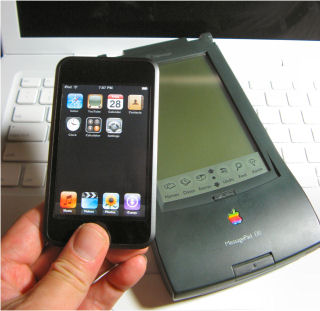
    iPod touch, Newton Messagepad 130, and Macbook

    I generally don’t mention rumors in my blogs. But, like many people, I’m anxiously waiting to see what Apple announces at its Macworld conference in a couple of weeks (Jan. 14-18). One persistent rumor this past year is that Apple is going to introduce some kind of subnotebook sized device. A couple of people are even speculating that it is touch screen device closer in size and form factor to the old Apple Newton instead of a conventional notebook. That would put it around the size of the Nokia N700 and N800 series devices. If this is true, I sure hope Apple learns the lesson Nokia leanred with the release of the N810 and provide a physical keyboard. I still am not comfortable and fast on the iPod touch’s screen keyboard. And, while there are people who have become proficient with it, I suspect many more are in my situation (slow with lots of errors).

  • New U.S. Fed Spare Battery Travel Rules Starting January 1, 2008

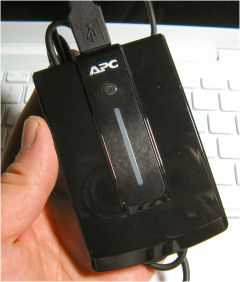
    APC Mobile Power Pack

    The U.S. Department of Transportation has new rules regarding to traveling with spare Lithium-Ion batteries that go into effect on Jan. 1, 2008. Check out the…

    SafeTravel.dot.gov

    …site for the details.

    I wonder how much variability there will be among TSA screeners looking at items like spare notebook computer batteries, spare digital camera batteries, and my power workhorse the APC Mobile Power Pack (see photo above)?

  • GettingTasksDone Doesn’t Support OpenID on an iPhone or iPod touch

    GettingThingsDone.com

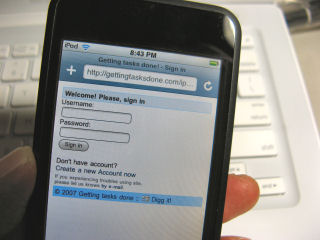
    Saw a blog post over on jkOnTheRun asking if anyone tried using the iPhone formated website for GettingTasksDone.com on an iPod touch. I figured, hey, I have an iPod touch so I’ll check it out. Given my inability to learn to tap-type on the touch’s screen, I headed over to the normal desktop formatted version of the website to login. It said it supported OpenID, so I logged in with my OpenID instead of going through the registration process. This OpenID login procedure seemed to break near the end of the process. But refreshing my screen indicated that I was logged in. I created a pair of tasks and then went back to the iPod touch. But, guess what, the iPhone formatted site doesn’t seem to let me login with OpenID. Since, I’m too lazy to register for this site, I let it go at this point.

    It does look like the iPhone formatted site works fine on an iPod touch (no surprise). But, I wish it worked with OpenID too. If you are not familiar with OpenID, click on the link for it above and read a bit about it. You’ll probably like the concept once you learn more about it.