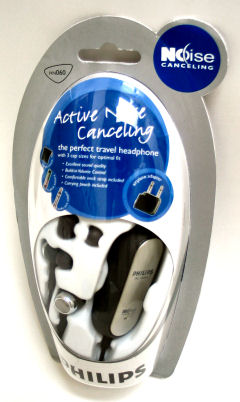
 I bought the Philips HN060/37 Noise-Canceling Earbuds
Blog
-
Philips HN060 Noise Canceling Headphones
-
Google Mobile Changes?
Google Mobile seems to have changed quite a bit since I mentioned it last October. If you browse google.com, it automatically redirects to a mobile device friendly page google.com/m. Unlike the full-sized personalized page, the mobile friendly version can only have up to six page modules added (weather, movies, news sources, etc.). There aren’t any links to other mobile friendly Google properties, but other Google sites redirect to mobile friendly pages too. gmail.com and news.google.com look fine on my Windows Mobile Pocket PC. One nice touch is that GMail can be used over an SSL encrypted session on a Pocket PC or Smartphone by using https://gmail.com instead of http://gmail.com.
-
Digital Photography Weblog: 13 best tips for Improving CameraPhone Pictures
Just ran across an interesting entry in the Digital Photography Weblog…
13 best tips for Improving CameraPhone Pictures
I’m a huge fan of cameraphones even though the ones I’ve tried don’t even come close to the quality of a conventional digital camera. I even wrote a couple of cameraphone hacks for the book Digital Photography Hacks
. You can find a free PDF of one of the hacks I wrote for that book that discusses creating panoramic scenes using cameraphone photos at: Get the Big Picture with a Little Cameraphone.
-
Being Mobile Still Isn’t Simple for Everyone
 After spending an intense week at the Microsoft MVP Global Summit, being faced with a 12 noon hotel check out and a 5:20pm flight out of SeaTac, I decided to spend a bit of change to purchase a one-day pass that lets me hang out in an airline club lounge that provides a work desk, A/C outlets, and WiFi access (and snacks and soft drinks too).
The person at the lounge’s front desk handed me a WiFi brochure. My MacBook didn’t need any special instructions to connect. It simply told me that my preferred access point was not available and asked if I wanted to connect to one that was. After approving that action I was online.Looking through the troubleshooting section of the brochure turned out to be interesting. It seems that Linksys 802.11G and Dell TrueMobile (1300 and 1400) WLAN Cards. I found it interesting that products that, I would guess, are in a large percentage of notebooks would be problem cases.
-
Getting Out of Cell Phone Contracts
Yesterday’s USA Today had an article titled…
Consumer website offers tips, guides on getting out of contract
…that features info from Meghann Marco from The Consumerist website who provides tips on ways to get out of cellphone contracts without incurring a penalty. There are actually three related articles on page 5B in the March 15 (Thursday) issue. The impetus for these contract breaking articles is, of course, the impending release of the Apple iPhone sometime this summer.
-
Bluetooth: Safety First
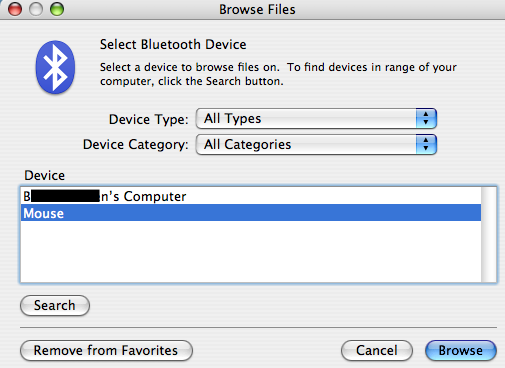
With all the discussions about WiFi safety, we sometimes forget that the other wireless protocol, Bluetooth, needs to be secured too.I was trying to pair a new Microsoft Wireless Notebook Presenter Mouse with a MacBook over Bluetooth this evening in my hotel room. I was a bit surprised to see someone else’s Bluetooth enabled notebook show up in addition to my new mouse. I shouldn’t have been, of course, Bluetooth has a 10 meter range (or greater depending on the hardware used) and can penetrate walls. And, this person left his notebook’s Bluetooth radio in Discover mode. Since 10 meters is a bit larger than 30 feet and these hotel rooms are not larger than 30 feet long, I could see the notebook.
The moral to this story is to check your devices: Notebooks, PDAs, phones, etc. Then, make sure Discover mode is turned off except when you need to have the device probed by some other Bluetooth device for pairing.