Reader D.K. asks: not sure who to ask on this one, but on an htc device (imate sp5) – do you know if there’s a way to recover contacts on there if the device had them wiped off by outlook via activesync over usb? i have not done anythign to the device since it was wiped, im hoping that the data is still on there, but needs to be reassociated with its metadata.
First, ouch! I’m not even sure how something like that can happen. But, I won’t ask. I’ll assume some unfortunate accidental user error was the cause. Second, the data may or may not be there. But, I don’t know of any utility off-hand to recover from that sort of error. Third, this is a good time to get on the soapbox for a general message to my fellow users of Windows Mobile Devices…
Two weeks ago when writing about the recently released Windows Mobile 6 Reference Model, I noted that none of the four user categories noted in the manual included a consumer end-user group. Microsoft designed Windows Mobile for enterprise use, not for individual consumers. The by-product of this design focus means that there is an implicit assumption that the Windows Mobile user is part of an enterprise that uses Microsoft Exchange Server and has an IT staff that performs tasks like configuration, backup, and restore. If you, like me, bought one as an individual consumer without enterprise support, you need to be prepared to do things like think about issues like disaster recovery and business continuance as an individual without supporting staff. I plan to discuss how I’ve tried to plan for my own DR/BC in a post or two later this week.
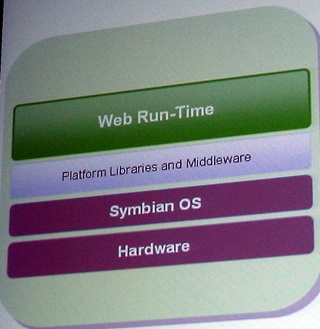 I saw a demo of the Nokia Web Run-Time for S60 (aka Widgets) this past Monday. It is an interesting development technology for the Nokia Series 60 (S60) based phones of the future (current S60 models will not support it). The idea is to leverage web developer skills to create applications for S60 phones. Applications are developed using HTML, CSS, and Javascript. The source code is compiled, placed into a Zip file, and copied over to the phone for installation there.
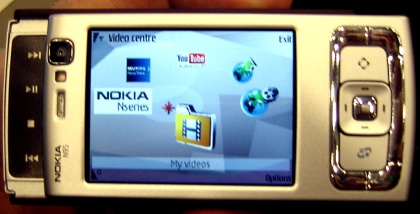 I finally saw the Nokia N95 smartphone up close and personal. And, it is quite a phone. The top (left in this phone) slides out to reveal the multimedia controls. The bottom (right on this photo) slides out to reveal a dialing keyboard. The lack of a QWERTY thumb keyboard is the only shortcoming to this otherwise remarkable looking phone. I wish Nokia had used an LCD soft keypad like Microsoft does in Windows Mobile Pocket PC Phone Edition devices and provided a pull out QWERTY keyboard at the bottom instead.