

Palm announced (but did not release) its Palm Foleo mobile companion today. It has a 10 inch LCD screen, full-size keyboard, 5 hours battery life, email and other applications, and no hard drive. I got so excited about it, I bought it!!! Uh, well, actually that device in the photo above (device on a desk next to a Casio Palm-size PC)) does meet the Foleo description. But, it is a Compaq Aero 8000 that I bought in 1999 while attending the Microsoft Windows CE Developers Conference in Denver. And, the similarly spec-ed Jornada 820 (with an 8 inch LCD) is from 1998. It is also a Windows CE Handheld PC. Yes, neither one had WiFi or Bluetooth. But, nothing back then did. The Handheld PCs were great. How great? I fired up the HP Jornada 820 last year and used it to write most of Windows for the Intel Mac published by O’Reilly Media. I was very disappointed when the Handheld PCs faded away. And, since the Microsoft UMPCs are nowhere near the $500 level they were aimed at, I am saving my nickels and dimes to by a Palm Foleo when it is released. It will be great to have a Handheld PC again (even if it does not run Windows CE).
 I maintain another blog (
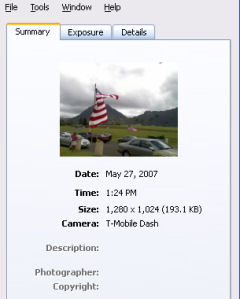 The T-Mobile SDA (Windows Mobile 5) smartphone didn’t place any EXIF data in its photos. The T-Mobile Dash (Windows Mobile 6), however, does. It doesn’t store much EXIF data. But, the Dash at least identifies itself as the camera type. This means that if you use it to upload photos to sites like Flickr, statistics about camera types will tally it correctly and viewers of your photos can tell it is a camera phone. It also stores data, time, and resolution and file size. I noticed that flash information is also stored even though the Dash does not have a flash (or one that is evident to me).
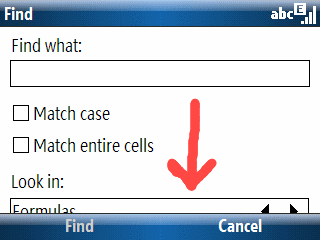 I found a minor display error in Excel Mobile running on a Windows Mobile 6 T-Mobile Dash (Smartphone; AKA Standard Edition). The “Look in:” selection box in the “Find” window is not completely displayed. It is still usable since I can see enough of the option to figure out what the choices are. But, it would be nice to see the whole thing. I suspect we’ll see a few more of these screen form format glitches as time goes by. The variety of resolutions and screen orientations (landscape or portrait) is bound to mess up some applications on the Pocket (Classic or Professional Edition) and Smartphone (Standard Edition).
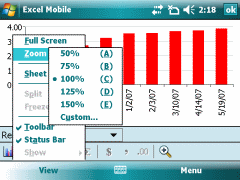 I’ve got Windows Mobile 6 on a Pocket PC to compare with a Smartphone (or Professional and Standard Editions if you prefer). Word Mobile and Excel Mobile have obvious advantages on the larger Pocket PC format factor with a touchscreen. But, it is amazing how much nicer some features like word completion look on a Smartphone vs. a Pocket PC. You would think the more mature (from an editing perspective) Pocket PC would have the advantage. But, that is not the case from my point of view. Despite this, though, entering information in Word Mobile or Excel Mobile on the Pocket PC is still a much better and easier experience overall.