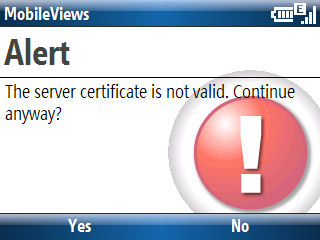
If you use POP3 or IMAP4 server to retrieve email, it is always a good idea to turn on SSL (Secure Socket Layer) to encrypt the data. However, if you use a web host’s email server like I do, you more than likely will have an SSL certificate mismatch. If you happen to be looking at your Windows Mobile smartphone, you will see a message like this one warning you about this mismatch. Pressing the Yes button skips over this issue and lets email flow down to your phone. However, if are not looking at the phone, no mail will sync up. And, if you do not see this message, you may not notice this for a while. My personal practice is to start manual mail sync at least once a day to avoid mail retrieval issues due to this certificate problem.
Blog
-
Back to Basics: Windows Mobile Mail, SSL, and Web Hosts
-
NBC Videos for iPhone and Windows Mobile

NBC’s mobile portal provides streaming video (including full episodes of some shows) on both Windows Mobile devices and the iPhone (and iPod touch). Head over to……to see the site and videos. If you use an iPhone or iPod touch, you’ll be redirected to a site specific for them (see the screenshot above). You need to be patient with the video streams even when using a wireless LAN. It took about 30 seconds for it to buffer on my HTC Advantage. Then, the audio stream started without video for another 10 seconds or so.
-
More ActiveSync Weirdness: Does NOT Work with USB Hubs
ActiveSync 4.5 has been working as well as can be expected of it (works about 85% of the time) on my PC running XP for a number of years now. I have a USB-to-mini-USB cable plugged into a powered USB hub that I’ve used with a number of mostly HTC Pocket PCs and Smartphones during this time. However, for the past couple of days I have not been able to sync any Windows Mobile device via ActiveSync 4.5 if they are plugged into any USB hub (I’ve tried two completely different hubs). The devices do sync (sometimes anyway) if plugged directly into a USB port on the PC itself. The hubs work fine with other USB devices (mouse, printer, flash card reader, etc.). So, I’m pretty sure the hubs, their cables connected to the PC, and the power cords (both are powered hubs) are working.
-
TyTn Windows Mobile 6 Oddball MP4 Video File Format
The HTC TyTn is a great Pocket PC Professional Edition device. Mine was upgraded to Windows Mobile 6 last year and has been working great. I noticed one oddity about it that finally turned to bite me yesterday though. I noticed that the only video recording format supported is MP4. This didn’t bother me until I tried to bring video recording I made of the line formed outside of a local Apple store yesterday. Nothing I had on a Windows PC or Mac could bring the MP4 file in and edit it. I tried Windows Mobile Maker, VLC Player (which can transcode files), iSquint, and iMovie. All of them complained about the files audio track. I finally ended up uploading the raw MP4 file to YouTube. YouTube was able to deal with it. But, I wish I had be able to put a title on it and maybe splice in a shorter second video file I made.
-
Upgraded my iPod touch to 2.0
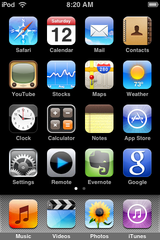
I updated my iPod touch to 2.0 this morning. The process (which cost $9.95 + applicable taxes) was relatively smooth though it took a long time because of the steps to restore the touch to factory conditions before flashing it to 2.0. This was all automated, however. So, the process was not painful except for watching all this happen. The update file was a 222.6MB download.You can see from the screencap above that I’ve already added a few of the free apps from the iTunes App Store. BTW, the screen capture procedure (press and hold Home button, then press the Power/Sleep button procedure courtesy of Gizmodo) works on the iPod touch as well as the iPhone 3G.
All my media files (podcasts, etc.) were wiped out during the upgrade process. But, various settings like my WiFi and mail setting were preserved. So, I was back in the wireless LAN as soon the upgrade finished. Moving media back to the iPod touch took a while. So, make sure you have 30 to 60 free for the process of buying/performing the upgrade.
-
iPod touch 2.0 Upgrade Available (But, I’m Not Biting Yet)
According to various blog posts, the iPod touch 2.0 upgrade is finally available for purchase (US$9.95) and download. But, I learned my lesson from the first iPod touch 1st day download fiasco when the site balked, charged me twice, and didn’t actually update anything for a while. I’m going to sit and wait for a little while before updating my touch this time.