Category: Mobile Devices

  • The Digital Slowness Paradox

    The biggest complaint from most people in the early days of consumer digital cameras was the lag between the time the camera shutter button was pushed and when the photo was actually captured. That problem hasn’t completely disappeared yet (except in higher end models and DSLRs) . This seemed odd to most people (esp. non-techies) who expected all things digital to be better-faster than things-analog.

    Unsurprisingly, digital slowness is apparent in all kinds of devices now. Some smartphones seem to take forever to fire up and enter a ready-to-use state. My Dash, for example, has a multi-second delay between the time I push the power button to the time it actually starts to boot (something visible on the screen). And, it takes, perhaps, a full minute before the phone is actually ready to make a phone call. The Pocket PC doesn’t appear to have this problem for most users because it is usually in suspend mode and not actually off. But, if you perform a soft reset, you’ll probably need to wait a bit before you can use the Pocket PC again.

    The most annoying sources of digital slowness for me, however (aside from Windows XP/Vista’s booting speed) is television related. My digital cable TV box seems to take forever to change channels. The old TVs with channel dials (back when VHF channels were limited to 2 through 13) were instant in changing channels. Digital cable boxes have a noticeable lag. And, the current generation of HD TVs seem to take many seconds to turn off or on. Shades of vacuum tube TVs. I think the TV manufacturers should add the old tube shrink-expand look to let us know when they are going on or off.

    And, then , of course, there are Windows XP and Windows Vista. Their login account model that launches all kinds of applications after the user login process (including all  kinds of security software) means that it might be several minutes before various processes settle down to the point the user can actually use the system. UNIX, Linux, and Mac OS X (really a BSD UNIX variant) fire up most processes before any login takes place. So, from the end-user point of view, it seems they take less time before you can use them.

    Let’s hope we never get digital flashlights or fire extinguishers where instant-on should really be instant.

  • Zune vs. iPod Language Handling Differences

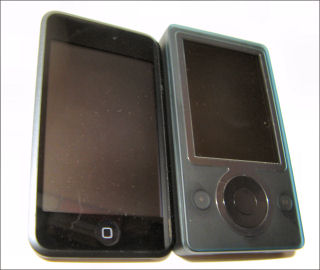
    iPod touch and Microsoft Zune

    An odd confluence of events took place over the past few days. First, my Mac mini died suddenly and without warning last week (which left me Mac media-less since I don’t keep media on my Macbook). My iPod touch arrived on Monday. Then, Microsoft announced the new Zunes yesterday. My 1st generation Zune doesn’t have the 2.0 update yet. But, it got me thinking about the Zune again. So, I decided to put music from the same CD on both devices to see if my non-golden ears could hear any difference. I used a CD that my daughter and I have been listening to lately… Utada Hikaru’s Single Collection, Vol I (an import).

    However, before I could get to the audio comparison I ran into some interesting differences in the way the Zune desktop software and iTunes dealt with the disc’s contents. Apple’s iTunes brought in the CD exactly as shown on the jacket. Title parts that were in English (roman letters) remained in English. Title characters in Katakana (phonetic Japanese characters) stayed that way. The Zune software, on the other hand, decided to, um, transliterate from Katakana characters to roman alphabet. The Zune software couldn’t figure out one of the titles at all though. So, it is listed as “[Untranslated]”.
    The other difference that amused me was how the Zune software and iTunes decided to deal with the artist’s name. iTunes left it Japanese characters and sorted it out of range (after “Z”). The Zune decided to transliterate it to “Hikaru Utada”. And, this confused me when I tried to search alphabetically by artist. You see it reversed the expected Surname/Given-Name order (Utada Hikaru) to the western Given-Name/Surname order (Hikaru Utada). So, I was doubly confused. It was not listed in the “U” section or out of range (after Z).

    It will be interesting to see what the Zune 2.0 firmware update and, presumably, new Zune desktop software does when it becomes available.

  • Viigo Free RSS Reader

    The Microsoft Windows Mobile Owner Circle current featured free offer is Viigo. This free app for Windows Mobile and other device platforms is an RSS feed reader. You can find out more about it on the Virtual Reach Viigo download site.

    I haven’t tried it myself. So, let me know what you think if you have tried it. It looks like Viigo lets you manage your RSS feeds from a web page (after signing in). Does that mean you have to be connected to the net to view feeds? One of the things I like about the Ilium NewsBreak RSS reader is that it just downloads the feeds and lets you read them even if you don’t have network connectivity (deep in a large building, etc.).

  • iPod touch and T-Mobile Dash – Tactile Impressions

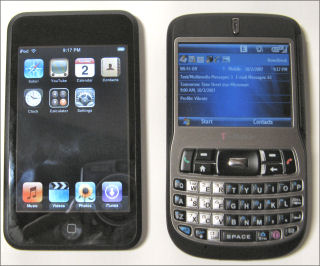
    iPod touch and T-Mobile Dash

    My 16GB iPod touch arrived yesterday. Since I’m probably among the last of the mobile enthusiasts who got a touch (even though I pre-ordered it the day it was announced), I’m not even going try to write a mini-review. However, as a Windows Mobile enthusiast, I thought other Windows Mobile users might find a couple of quick observations from that point of view interesting.

    The T-Mobile Dash (Windows Mobile 6 Standard Edition, formerly Smartphone) has been my main device for the past half-year or so. As you can see from the photo the iPod touch and the Dash are pretty close in height and width dimensions although the touch is much thinner than the Dash (0.31 vs. 0.5 inches). According the to iPod touch spec page and the T-Mobile Dash spec page, both are 4.2 ounces. Frankly, I’m having a hard time believing this. The touch feels much much heavier than the Dash. But, I don’t have a scale to check this, so I’ll believe the specs. You can see that the screen is about twice the physical size of the Dash’s screen and is exactly twice the resolution (480×320 vs. 320×240).

    The one thing that became obvious real fast is that thumb typing as I know it is impossible for me on the touch. The lack of tactile feedback and what appears to be a slight digitizing offset (selection appears slightly to the left of where I touch the screen) is deadly. My typing mode (especially for passwords) is reduced from two thumbs to my right hand index finger. I’m really tempted to use a stylus when I need to type on the touch. The Dash’s keyboard, on the other hand, is the best thumb keyboard I’ve used on a Smartphone (the Universal’s and TyTn’s keyboard are my favorites on the Pocket PC side of the Windows Mobile house).

    One somewhat surprising aspect of the touch’s lack of tactile feedback is that I don’t think I can use it without looking at the screen. I’ve also used the iPod nano and the 5th generation iPod (video). Both of those are very easy to use without looking at the device because the click wheel gives lots of location and tactile information.

    IMHO Apple was wise in NOT positioning the iPod touch as a PDA. It is clearly not a PDA. On the other hand, its Safari browser is clearly superior to Windows Mobile’s Internet Explorer (and Opera mini on Windows Mobile — for me anyway). That combined with a relatively easy (but not great) YouTube app makes the iPod touch the current overall multimedia champ. I just looked at the new Zune announcements. I think the Zune still has a lot of catching up to do. But, more on that after the firmware upgrade for the current generation Zune’s become available next month. I’ll flash my Zune then and give it a spin.

  • HTC Shift: Interesting but too $$$ for Mainstream

    HTC announced the ultraportable HTC Shift running Windows Vista Business Edition. At 800 grams (1.76 pounds) and with its 3G/HSDPA and SnapVUE low power mode (no Windows Mobile as rumored long ago), it is unique compared to the UMPC device crowd. However, at $1580, it is relatively pricey (compared to standard sized notebooks) although it is not outrageous compared to the truly overpriced and underpowered UMPC devices. If it had come in at $1000 or less (or even $1200), it might have a chance for mainstream acceptance. However, at nearly $1600 (without a CD or DVD drive), it will join the UMPC as being a specialty device for those who crave true mobility with an XP or Vista based device.

    The various rumor sites say that Apple is planning to release a sub-notebook class device in the near future. Apple has been able to get away with somewhat pricey devices. But, if they come in with a slick looking sub-2-pound device for under $1000, I think the UMPC and the Shift will be relegated to discount bins.

    I’m also waiting for the Asustek EEE PC. I though it was supposed to appear in September. But, here it is October and no sign of it yet. Will it go the way of the Palm Foleo?


    UPDATE: According to CNET, the Asustek EEE PC is supposed to be available later this month (October). However, its retail price is rising from $199 to $260 (still very reasonable).

  • Thumbing Around an iPod touch Screen Keyboard

    My iPod touch is still wandering around in FedEx-land. But, I was able to use my daughter’s iPod touch for a few minutes to help her set up WiFi access. I found it nearly impossible to type on the screen keyboard in portrait mode. The lack of tactile feedback from a physical keyboard is a real drawback. However, using the screen keyboard in landscape mode was a bit better though I still pressed the wrong key way too many times. I think the 2.0 versions of the iPhone and touch really needs a slideout keyboard even though it would increase the thickness of each device. I’ll get a better feel for this after I have some time to play with my own device (which should arrive soon).