Palm announced (but did not release) its Palm Foleo mobile companion today. It has a 10 inch LCD screen, full-size keyboard, 5 hours battery life, email and other applications, and no hard drive. I got so excited about it, I bought it!!! Uh, well, actually that device in the photo above (device on a desk next to a Casio Palm-size PC)) does meet the Foleo description. But, it is a Compaq Aero 8000 that I bought in 1999 while attending the Microsoft Windows CE Developers Conference in Denver. And, the similarly spec-ed Jornada 820 (with an 8 inch LCD) is from 1998. It is also a Windows CE Handheld PC. Yes, neither one had WiFi or Bluetooth. But, nothing back then did. The Handheld PCs were great. How great? I fired up the HP Jornada 820 last year and used it to write most of Windows for the Intel Mac published by O’Reilly Media. I was very disappointed when the Handheld PCs faded away. And, since the Microsoft UMPCs are nowhere near the $500 level they were aimed at, I am saving my nickels and dimes to by a Palm Foleo when it is released. It will be great to have a Handheld PC again (even if it does not run Windows CE).

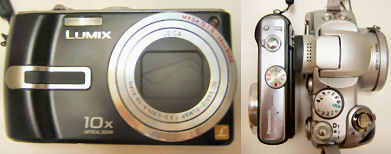
 this evening. The photo on the left is the TZ3K compared to the Canon PowerShot S1 IS 10x optical zoom camera from a few years ago (the current model is the
  which about the same size as the older S1. Panasonic’s controls don’t seem as intuitive or simple as the Canon IS. However, that might be because I have used a lot of Canon digital cameras over the years and this is the first Panasonic I’ve tried. However, there is a lot to like about a camera with 10x optical zoom that is so much smaller than the Canon IS series and with a larger 3 inch bright LCD. It’s also nice not to have to deal with a manual lens cap (what a hassle). More on this camera later… I’m also going to be playing with a
  in the next week or so. It came out last Fall and was, I believe, the first of the Canon A series cameras to have optical stablization. Its price has started to drop. So, I’m guessing it will be replaced by a higher resolution version within the next few months.