
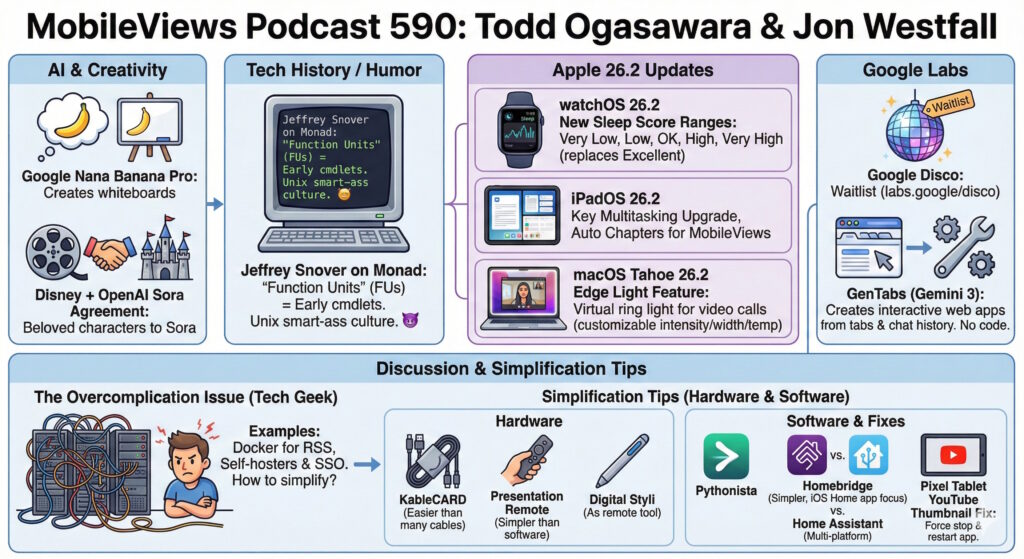
In this episode, Todd and Jon discuss the latest AI agreements, updates to the Apple ecosystem (OS 26.2), and the history of PowerShell. The core discussion focuses on the “overcomplication issue” facing tech enthusiasts and offers hardware and software tips to simplify daily workflows.
AI & Industry News
- Disney & OpenAI: The Walt Disney Company has reached an agreement to license characters to OpenAI’s Sora.
- Google Labs: Todd joined the waitlist for “Google Disco,” a tool that uses “GenTabs” to create interactive web apps and complete tasks using natural language without coding.
- Visual Podcasting: Todd discussed using “Nano Banana Pro” and Gemini to create visual whiteboard summaries for podcast notes.
Apple OS 26.2 Updates
- watchOS 26.2: Features updates to Sleep Scores, which Jon notes can feel “judgmental” regarding sleep quality.
- iPadOS 26.2: Reintroduces multitasking features like slide over and enables “Auto Chapters” for podcasts.
- macOS 26.2: Introduces “Edge Light” (a virtual ring light for video calls) and “low latency clusters” for local AI development on M5 Macs.
Tech History
- PowerShell Origins: Jeffrey Snover, creator of PowerShell, revealed in a blog post that “cmdlets” were originally named “Function Units” (FUs), reflecting the “Unix smart-ass culture” of the era.
Discussion: Simplifying the Tech Stack
The hosts discuss the tendency to overcomplicate setups, such as using Docker for RSS feeds or complex SSO for home use. They recommend the following simplifications:
Hardware
- KableCARD: A credit-card-sized kit containing multiple adapters, a light, and a phone stand to replace carrying multiple cables.
- Presentation Remotes: Use a simple dedicated remote ($20–$30) or repurpose a Surface Pen via Bluetooth instead of relying on complex software solutions.
Software
- Pythonista (iOS/macOS): Run simple local scripts (e.g., GPA calculators) rather than paying for dedicated subscription apps.
- Homebridge: A lighter-weight alternative to Home Assistant for connecting IoT devices (like Sonos) to Apple HomeKit.
Troubleshooting Tip
- Pixel Tablet YouTube Glitch: If the YouTube app on the Pixel Tablet displays unusable, giant thumbnails, the fix is to clear both the app’s cache and storage/memory.
Available via Apple iTunes.
MobileViews YouTube Podcasts channel
MobileViews Podcast on Audible.com