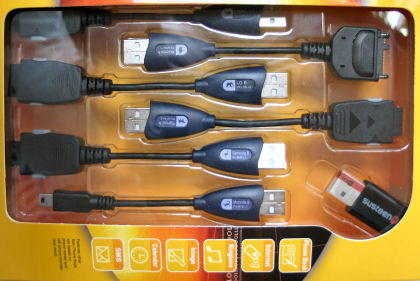
One of the phones in my household is a Sanyo Katana phone. Although it is not a smartphone, it does have Bluetooth, a camera, and the usual applications that phones have these days. Originally, I paid for web service and photo uploads. But, since those features were rarely used, I moved the phone back to basic voice service. We still wanted to get photos off of the phone now and then though. So, I went in search of something cheaper than $15/month to do that. This weekend I found the…
Datapilot Cell Phone Data Transfer Suite Universal
…at my local Costco and bought it. The box contained a bunch of cables for various phone models as well as a USB Bluetooth dongle. I installed the suite’s software and tried Bluetooth first. The Windows XP PC and the phone seemed to pair ok. And, it looked like contacts information could be synced. But, there didn’t seem to be a way to copy the photos off of the phone.
I tried the USB cable next. Getting that to work was an exercise in frustration. But, I eventually managed to get it working (don’t ask me how) and was able to move the photos over. I can understand how the average review of the 39 reviewers on Amazon gave it 2 out of 5 stars. It gave me a bit more appreciation for ActiveSync (but not that much :-). On the other hand, if we use this Datapilot Suite for more than 3 months, it will have paid for itself.
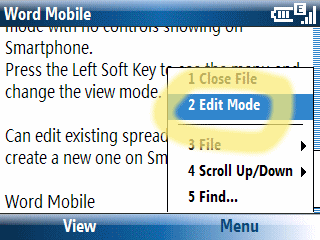 Last month I noted the PC World magazine article about Windows Mobile 6 smartphones that incorrectly said that Word Mobile and Excel Mobile on WM6 smartphones could not edit documents. This month iti s Maximum PC magazine’s turn to get it wrong. The Smartphone State of the Union article in the July 2007 issue of Maximum PC includes mini-reviews of many smartphones. Page 44 has a 1/3-page review of the T-Mobile Dash says: You’ll be able to open MS Office documents but not edit them. Given paper publication lag time, this article was probably written way before Windows Mobile 6 became available. Pre-WM6 smartphones did not come with Office Mobile components. So, the review may be speaking of some third party viewing application (but does not clarify this). WM6, however, does provide mobile versions of Word, Excel, and PowerPoint. Word and Excel do have edit modes. But, they are just that: Modes. It is not seamless experience like what you find on the desktop or Pocket PC. It is more like old moded vi editor in UNIX. You need to select Edit Mode from the Word or Excel initial menu (the Word menu is shown here). A different menu structure appears at that point and you can edit an existing document.
 (Amazon affiliate link) became available in the US earlier this month (although it had been available in Japan and Europe months before). Reading through the comments on Amazon, I learned that while the item is simply listed as the Nintendo DS Browser, it is actually specifically for the second generation DS Lite model. The Opera browser itself is on a standard small DS cartridge while a memory expansion card is provided in non-standard sized GBA card that only fits in the DS Lite model. So, if you have the first generation Nintendo DS, make sure you get a version specifically for that model.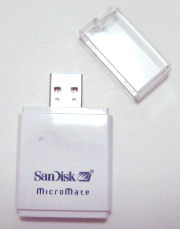
 for use with a digital camera. When I bought it the Micromate SDHC reader seemed like a nice to have add-on. However, since the 4GB SDHC card does not seem to be readable by my older SD readers, it became a must-have accessory. The SDHC card is recognized immediately when used with the bundled reader and file transfers are lightning fast. The SDHC card also slips into and out of the reader without any fuss.