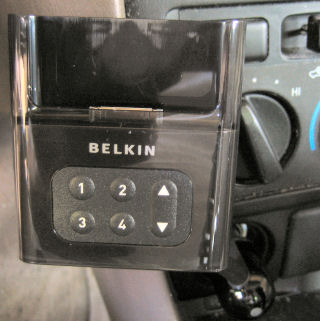
 The Belkin iPod TuneBase FM
The TuneBase (pictured to the left) plugs into a car power adapter (AKA cigarette lighter) while the TuneCast used an AAA battery. One of the problems I had with the TuneCast is that the battery would rapidly die while driving. The TuneBase also charges a connected iPod which means that both the iPod and the TuneBase are powered and ready to go all the time.
The TuneBase can tune into arbitary frequencies while the TuneCast is limited to four fixed frequencies. This can be a problem if none of those four stations provide a clear signal to the car radio. The FM radio frequency is displayed on the iPod’s screen when configuring the unit. This makes it pretty easy to quickly configure the system with your car radio.
The sturdy looking flexible arm can be adjusted to get it out of the way of other dashboard controls. I am kind of concerned about how much pressure it puts on the cigarette lighter though. I think the best thing to do is to use two hands to insert and remove an iPod from the TuneBase.
 Most people seem to pan across a landscape and stitch photos horizontally (as shown in my O’Reilly example a few blogs ago). However, you can create some satisfying stitched photos by taking a series of photos down-to-up (which I find easier than up-to-down) with a cameraphone. I took three photos with a Nokia 3650 cameraphone a couple of years ago. The vertically stitched result can be seen to the left. It didn’t make the cut for the Digital Photography Hacks book. But, you can see the result here.