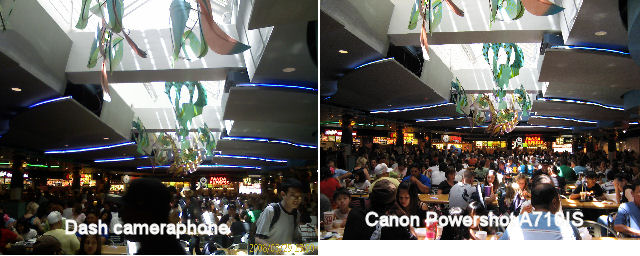
Discussions (and sometimes rants) about camera phone photos usually steer towards pixel count, clarity, and color. However, there are subtler differences between camera phone photos and digital camera photos. Take the two photos above taken using a T-Mobile Dash cameraphone (left) and a Canon Powershot A710IS point-and-shoot digital camera. I’ve resized both photos from their respective 1.3 megapixel and 7 megapixel resolutions so that both images are 320 pixels wide.
The first thing you probably noticed is that when resized to the same width the Dash’s photo is much squarer than the A710IS’. Cameras vary slightly in aspect ratio. So, if something seems slightly odd in your cameraphone photos, compare it to the aspect ratio of the digital camera you normally use. Cropping the camera phone photo to match the aspect ratio you are comfortable with might help.
Although I did not take the two photos at the exact same angle, you can still see that the camera phone photo seems flatter than the digital camera’s. Seeing distinct people (mostly heads here) drops off rapidly after a row or two of tables in the food court. The digital camera has a slightly wider angle of view even though I took both photos from exactly the same spot.
So, if something about your camera phone photo doesn’t seem quite right to you. It may not be the resolution or even the sharpness of the photo. It might be some of the subtler aspects of camera phone’s imaging characteristics that might be at play for you.