Subscribe in a reader

September 2007


Thumbing Around an iPod touch Screen Keyboard

My iPod touch is still wandering around in FedEx-land. But, I was able to use my daughter’s iPod touch for a few minutes to help her set up WiFi access. I found it nearly impossible to type on the screen keyboard in portrait mode. The lack of tactile feedback from a physical keyboard is a real drawback. However, using the screen keyboard in landscape mode was a bit better though I still pressed the wrong key way too many times. I think the 2.0 versions of the iPhone and touch really needs a slideout keyboard even though it would increase the thickness of each device. I’ll get a better feel for this after I have some time to play with my own device (which should arrive soon).

Apple
Mobile Devices
iPod

Comments (2)

Permalink

Calendar Year View Incomplete in Landscape View
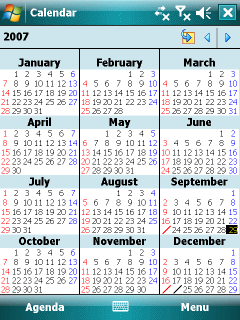
Calendar portrait view

Here’s a little oddity I noticed just a few weeks ago. The Windows Mobile Pocket PC can display a calendar in year view (something not available on the Smartphone AKA Standard Edition). However, while all 12 months are displayed if the Pocket PC is in portrait mode, only 8 months are shown in landscape viewing mode. You can scroll left or right to see the other 4 months. But, still, this seems lame.
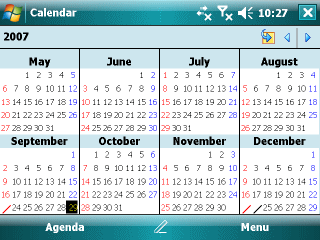
Calendar landscape view

Mobile Devices
Pocket PC/Phone Edition
Windows Mobile

Comments (0)

Permalink

Work with Office 2007 Files on Windows Mobile 6 Devices

Just read the announcement in Jason Langridge’s (Microsoft’s Mr. Mobile) blog about the release of…

Microsoft Office Mobile 6.1: Upgrade for Microsoft Office 2007 file formats

This upgrade lets you work with (read and write) Office 2007 generated Word, Excel, and PowerPoint files. The upgrade is only for Office Mobile on Windows Mobile 6 devices. So, if you have an earlier generation device, this upgrade is not for you. Note that this upgrade is relatively huge at 6MB. However, the system requirements section says this space can be on a storage card. So, presumably, you can install this on a flash card instead of using up system memory.

The download page also mentions that it is possible to buy Office Mobile 6.1 if your device does not already have it. But, the link provided there just leads to a general Office Mobile information page at this time. I don’t see any link or graphic indicating this purchase can be made today.

Mobile Devices
Pocket PC/Phone Edition
Smartphone
Windows Mobile

Comments (0)

Permalink

53 Weeks in a Year

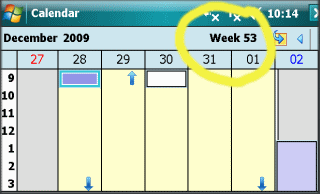
Windows Mobile calendar week 53

Did you know there are 53 weeks in a calendar year? Yep, according to Windows Mobile, that is the case for certain years. This is one of the oldest bugs and has been around since the Windows CE days. So, if you use week numbers for project planning, don’t use the Windows Mobile week numbers as your definitive guide.

Mobile Devices
Pocket PC/Phone Edition
Smartphone
Windows Mobile

Comments (2)

Permalink

NPR Mobile

NPR Mobile

NPR launched NPR Mobile at http://m.npr.org/. This mobile friendly site lets you either call in (voice phone) to listen to a show (not recommended IMHO) or listen to an audio stream (great if you have an unlimited data plan or WiFi). I tried it over a relatively slow EDGE network. It took a while for the audio stream to sync up, buffer, and then start playing. But, once it did, the sound quality was good and I didn’t run into any oddities. Navigating through the large and rich NPR site was quite easy on a WiMo6 T-Mobile Dash smartphone.

Mobile Devices

Comments (0)

Permalink

Windows Mobile is Apparently Not Interesting to the U.S.
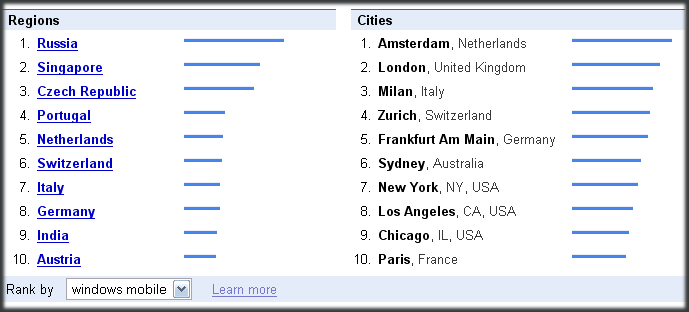
Google Trends for Windows Mobile

If put our faith in the results of Google Trends (now updated daily), then we in the U.S. apparently don’t care enough about Windows Mobile to search for it in Google compared to the rest of the world. If you take a look at…

Google Trends results for Windows Mobile

…you’ll find that the U.S. does not even show up in the top 10 world regions (countries) searching for the term Windows Mobile. San Francisco does show up at #4 in the cities list, however. However, if you limit the search region to the U.S., Redmond (home of Microsoft’s main campus) shows up as the #1 city followed by Seattle, Salt Lake City, and San Francisco again in position #4. Huh? Shouldn’t S.F. be #1 for the US if it is #4 worldwide? And, in less that 12 hours, the city rankings changed completely with S.F. dropping out altogether. Personally, I think that Google Trends is not quite firing on all cylinders.

Mobile Devices
Windows Mobile

Comments (0)

Permalink

MSN Video Beta + Windows Mobile = Nothing

MSN Video Beta

I just read about the MSN Video Beta. So, I figured that surely Microsoft enabled it to work with Windows Mobile smartphones to counter YouTube (which doesn’t play well with WiMo). So, I pointed a Pocket PC Phone Edition at http://next.video.msn.com/ and, well, it turns out I figured wrong. Once again, WiMo users are shut out of a Microsoft product. Not even the login link on the beta page works with WiMo.
And, where is Microsoft Office 2007 compatibility for WiMo anyway? Or, SkyDrive, or multi-page live.com?

Mobile Devices
Pocket PC/Phone Edition
Smartphone
Windows Mobile

Comments (0)

Permalink

What’s with the Names Windows Mobile Standard Edition and Professional Edition?

HTC TyTn and HTC Vox

Most non-geeky, non-techie people (if you are reading this, you are a tech geek, btw), seem to know how to distinquish the different Apple iPod models. The shuffle doesn’t have a screen. The nano is the little one with a screen The iPod (now iPod classic) is the big one. And, the touch… well you can touch its screen on purpose. It is the iPhone without the phone (for the most part). You don’t need to go into engineering or design philosophy details to distinguish the various models. And, note that the distinguishing names are all in lower case: shuffle, nano, classic, touch.

Now look (literally) at the Windows Mobile Standard Edition and Windows Mobile Professional Edition. You practically need to be an engineer to sufficiently distinguish the two devices past the touch non-touch dimension because the Professional Edition is not a true superset of the Standard Edition. The Pro Edition is actually missing a few features that are in the Standard. And, quick, look at the photo above and figure out which is the Standard and which is the Professional in under 1 second (the time it would take to distinguish between iPod models).

What is the deal with the Standard and Professional designations anyway? Is the Standard Edition for non-professionals? That’s the implication from the names, isn’t it? Microsoft needs to rethink this whole branding campaign. The previous Smartphone vs. Pocket PC Phone Edition was much easier for the average consumer to figure out (though still way to wordy) that Standard vs. Professional. The first thing they should do is create a secondary branding using WiMo instead of Windows Mobile just to shorten that part of the name. Then, they need to shorten the device category names to something like WiMo Touch (Pocket PCs with touch screens) and WiMo Phone (no touch screen) or WiMo One (one-handed Smartphone operations) and WiMo Two (two-handed Pocket PC operation). Or, how about WiMo Pocketphone and WiMo Smartphone? It would be a lot easier for non-techies to remember and cut down the typing and awkward sentences in articles and blogs :-)

Mobile Devices
Pocket PC/Phone Edition
Smartphone
Windows Mobile

Comments (6)

Permalink

Lotus Notes Traveler for Windows Mobile

Lotus Notes Traveler

Lotus Notes Traveler is scheduled for release sometime in 2008 (screen shot above obtained from IBM’s site). The big deal about this IBM product is that it will, for the first time, provide native Windows Mobile connectivity to Lotus Notes. I wonder, though, how widely accepted this will be buy Lotus Notes support staff may be very unfamiliar with Windows Mobile devices. And, I wonder how it will affect the long available CommonTime products that seem to currently be the product line of choice to get Lotus Notes and Windows Mobile devices working together.

Mobile Devices
Pocket PC/Phone Edition
Smartphone
Windows Mobile

Comments (1)

Permalink

Power Toys for .NET Compact Framework 3.5

OK, this one is for the Windows Mobile developers out there…

Power Toys for .NET Compact Framework 3.5

…was released on Sept. 12. The various toys focus on diagnostics and performance evaluation. The Known Issues list is quite long. So, be sure to read through the list before using the Power Toys.

Mobile Devices
Pocket PC/Phone Edition
Smartphone
Windows Mobile

Comments (0)

Permalink

diggm8: Digg Reformatted for Mobile Viewing

Diggm8

diggm8 (pronounced digg-mate) is a non-Digg affiliated site that reformats Digg.com for mobile browsing. Unlike Digg’s own iPhone formatted site, diggm8 works fine with a Windows Mobile IE browser.

Digg was my favorite post-Slashdot morning destination site. But, its focus has become so diluted that I’m looking for a new destination site. Any recommendations for something to succeed Slashdot and Digg (or TechMeme for that matter) for geekie news?

Mobile Devices

Comments (0)

Permalink

Smartphones Are NOT An Enterprise Tool

One of my big beefs with Windows Mobile’s roadmap for the past few years has been its focus on the Enterprise and mobile carriers instead of the consumer. So, here comes the Information Week 500 survey, and it reports that…

And those smartphones? Just 10% consider “issuing smartphones beyond a few top executives” a most-effective strategy of the past 12 months,…

IMHO 10% maketh not an enterprise strategy (as IW points out above). In the meantime, while people synching with Exchange Server may be OK, ActiveSync and WMDC remains broken. Windows Mobile is a great platform. But, it needs to be refocused on its core customers: Individuals on the street who go and buy their own phone and don’t have an IT department to support them.

Mobile Devices
Mobile Phones
Pocket PC/Phone Edition
Smartphone
Windows Mobile

Comments (1)

Permalink