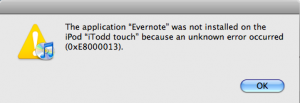
Evernote updated their iPhone client to version 1.2 and added the ability to edit notes. I ran into this error (see image above) after downloading the update using iTunes though. And, I was not able to update it at all directly from my iPod touch. However, after disconnecting the USB cable, it looked like the application actually installed on my touch. Firing it up I found that the new client can only update notes that are purely text. Even a file that included hyperlinked text with no other formatting was not editable.
Day: August 12, 2008
-
Evernote for iPhone Update to Version 1.2
-
Back to Basics: Email Key Sort
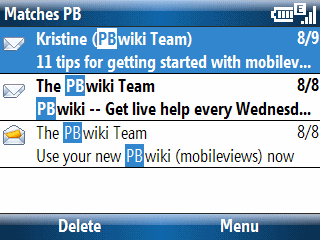
I cannot believe I did not know about this until yesterday. You all probably know that you can search through contacts and recent calls by typing a string on a Windows Mobile smartphone keyboard. Type O-G-A and my full name shows up as part of the search results of people in your contacts list, for example. But, I didn’t realize this also works with Email. In the example illustrated above, I tapped the keyboard letters P-B. As you can see, the email messaging client found this two letter sequence in both the From and Subject lines and highlighted the string. I am kind of embarrassed that I didn’t know about this useful email filtering feature until now. I wonder when it first appeared? It works on both the Standard (non-touch) and Professional (touch) Editions of Windows Mobile. -
Back to Basics: Which Idiot at Microsoft Decided Anniversary Events Should Alarm at Midnight?
Windows Mobile smartphones (Standard Edition) can be actually powered down. However, Pocket PCs (Professional & Classic Editions) are not really off unless the battery is pulled out. So, if you have an anniversary event (birthday, wedding anniversary) set in contacts, it wakes up at midnight and sets of the audible alarm (if that is turned on which is usually the case). I’d like to know which braindead idiot at Microsoft decided this is a desirable behavior.